












































What is the difference between Microsoft 365 and Google Workspace?
Whilst comprehensive collaboration tools have been around for almost a decade, it has never been a business priority. What was once optional has now become a strategic necessity. The pandemic accelerated the shift to hybrid work and collaboration applications remain one of the fastest-growing software segments in India.
According to International Data Corporation (IDC), India’s software market is expected to reach USD 18.4 billion by end-2025, up from USD 15.2 billion in 2024, and collaboration applications alone rose by approximately 32.7 % year-on-year. But with the market inundated with so many tools, Microsoft 365 business plans (formerly Office 365), and Google Workspace (formerly G Suite) being the most popular, how does one choose between them?
👉 Which is better — Microsoft 365 or Google Workspace?
👉 What is the real difference between the two?
Here are the key differences between Microsoft 365 Vs Google Workspace discussed in the article below:
Microsoft 365 vs. Google Workspace Overview
Microsoft 365 and the Google Workspace are Fortune 500’s most preferred collaboration tools. Both are subscription-based, charging organizations per-person per month basis, with similar objectives, they enable teams to collaborate, communicate, work from anyway ensuring team productivity while maintaining system and data security.
However, they differ in:
- Application design (web-first vs desktop-first)
- Cloud architecture
- Security models
- Storage limits
- Business email and admin controls
- Pricing
- Integration capabilities
Microsoft 365 vs. Google Workspace- Web or App based?
You can access both services across Windows, Linux and MacOS desktops. However, do note that, Google Workspace applications are web-based while on the other hand Microsoft 365 applications must be launched using their downloadable desktop clients.
Google Workspace → Entirely Web-Based
- Applications like Docs, Sheets, Slides run in the browser.
- Offline mode exists but is limited and requires pre-setup.
- Best for teams comfortable with pure cloud workflows.
- Requires consistent internet connectivity for optimal experience.
Microsoft 365 → Full Desktop Apps + Web Apps
- Offers powerful desktop versions of Word, Excel, PowerPoint.
- Web versions also available for browser-based work.
- Best suited for teams requiring heavy documents, formatting, large datasets, or advanced Excel features.
- Works offline without limitations.
So, the limitation with the Google Workspace is its need to constantly be connected to the internet to be able to work on it effectively, in a team. To ensure maximum productivity both applications do offer apps for iOS, iPad OS, and Android devices.
Microsoft 365 vs. Google Workspace- Business Email: Gmail vs Outlook
Gmail has an easy to use, less cluttered interface. It is like Gmail used for personal use which adds as a bonus. Making a move to a different platform is difficult from a user consumption point of view. But it is observed that if people are comfortable with the interface the adaptability is higher.
Outlook for Business on the other hand is loaded with features. Based on the sender it segregates your emails into your inbox, clutter and junk enabling you to respond to the important emails first.
Gmail
- Clean, minimal interface similar to personal Gmail.
- Easy adoption for new users.
- Integrated with Google Contacts and Calendar.
- Allows up to 30 aliases per user.
Outlook (Microsoft 365)
- Feature-rich with focused inbox, clutter management, and advanced search.
- Deep integration with Calendar, People, Tasks.
- Up to 400 aliases per user.
- Built-in message encryption, anti-phishing link protection.
- Supports voice commands and multiple device types.
The clean-up feature simplifies long email threads so that they become easier to follow. And the synchronization of all the contacts, calendar along with the email (as they’re part of Outlook itself) is truly rewarding. Gmail relies on individual applications of Google Contacts and Calendar Apps which are challenging to navigate through daily.
Outlook also offers data encryption in your mailbox before and after an email is sent. It also automatically deactivates any unsafe links that may contain phishing scams, viruses, or malware. With Outlook you also get voice-controlled navigation, support for multiple support devices, and more.
Microsoft 365 vs. Google Workspace- Cloud File Storage and Sharing
Google Drive vs One Drive
While there is little to differentiate between the Suites for the enterprise plans, the entry level plan of Microsoft 365 has larger space capacity compared to Google Workspace’s most basic version, also known as Basic. It offers 30 GB data storage option while Microsoft offers a dedicated 50GB inbox along with 1TB storage space.
Users opting for the Google Workspace Business and Enterprise plans enjoy unlimited storage space while Microsoft 365’s E3 and E5 plans have a storage space of 1TB. Both Google Drive and Microsoft OneDrive for Business integrate directly with their own office suites, and both allow you to access the files on any device.
Business apps in Microsoft 365 and Google Workspace
Microsoft 365 and Google Workspace both include productivity applications for creating presentations, documents, and spreadsheets. Both offer web and mobile based app versions, however, only Microsoft 365 offers desktop versions of its software to its customers.
What this means is you need to be connected to the internet while working on the Google applications. They do have the option of working offline but it needs to be updated when you get connected and it can be cumbersome.
Microsoft’s Advantage
- Desktop + Web + Mobile apps
- Rich template library
- 30+ years of user familiarity
- Includes:
- OneNote
- Planner
- Forms
- Power Automate
- PowerApps
- Delve
- Sway
- MyAnalytics
Google’s Advantage
- Simple, cloud-native apps
- Easy to use, limited features compared to Microsoft
- Includes:
- Google Forms
- Google Keep
- AppMaker (retired for most users)
Both Microsoft and Google do offer additional tools – Microsoft 365 comes with One Note an app that helps you take notes and have a To-Do list which integrates with Outlook, Microsoft Planner helping teams create plans and assign tasks, chat, share documents, keep track of updates etc.
Microsoft Forms that help you create polls, quizzes, surveys etc within the organization, Power Automate (previously known as Microsoft Flow), which enables the organization to automate repetitive tasks and integrate them into workflows.
Microsoft 365 Enterprise Plans also come with My Analytics, an analytics tool to indicate statistics about your work patterns including your collaboration time, employees or team members you engaged with most, how effectively you networked with your team etc, PowerApps, an easy simple-code app development tool, Delve – a smart tool that enables users find and organize information in Microsoft 365 and Sway, a tool for creating web-based presentations.
Google has similar tools however they’re not as powerful and smoothly integrated. Google Forms, probably the most powerful of the lot, enables you to create forms for getting feedback from personnel, submit time off requests, work asks etc. Google Keep, a note taking app is simple but not as sophisticated as One Note, and there is the AppMaker – Google’s development environment.
Collaboration Tools of Google Workspace and Microsoft 365
Both Google Workspace and Microsoft 365 are essentially collaborative tools. They’re built around the concept of ensuring collaboration amongst teams across the organization irrespective of its geographical boundaries. Neither essentially has a upper hand as the offerings depends on the customers short- and long-term expectations from the application.
Teams using either of the applications, Google Hangout or Microsoft Teams can work together on documents, spreadsheets etc in real time, keep track of versions and even review the change history. The upper hand for Microsoft 365 is that it has more advanced features such as built-in artificial intelligence services to help users create more polished documents.
And this is where Microsoft Teams has superiority with its online meetings, web and video conferencing facilities, group chats, customised workspaces, seamless in document sharing, effortless integration with SharePoint, OneDrive for Business and others. Google Workspace does offer Hangout Meet for its video conferencing but it’s not as powerful as Teams.
Microsoft 365 vs. Google Workspace: Pricing
Both platforms, Microsoft 365 and the Google Workspace offer multiple and highly competitive plans to accommodate to all organization demographics.
Google Workspace (India) Pricing:
- Business Starter: ₹160.65 per user / month (one-year commitment)
- Business Standard: ₹864 per user / month (one-year commitment)
- Business Plus: ₹1,700 per user / month (one-year commitment)
- Enterprise / Enterprise Plus: custom pricing
Microsoft 365 (India) Pricing:
- Microsoft 365 Business Basic: ₹145 per user / month (annual)
- Microsoft 365 Business Standard: ₹770 per user / month (annual).
- Microsoft 365 Business Premium: ₹1,830 per user / month (annual).
- Enterprise plans (E3 / E5): ₹3,160 per user / month (annual).
Additional features of Microsoft 365
Apart from the Advanced Reporting, E-Discovery tools, Data Loss Prevention Tools, Email Archiving features available in both Microsoft 365 and the Google Workspace, Microsoft 365 has some additional features in its enterprise grade plans including the Advanced virus protection, Personal and organizational analytics, Cloud based phone call hosting services and Mailbox rights management.
Microsoft 365 vs. Google Workspace- What is best for your organization?
As we have seen, both Microsoft 365 and the Google Workspace are highly powerful tools and ideal in a remotely working environment of today.
Which Is Better for Your Organization?
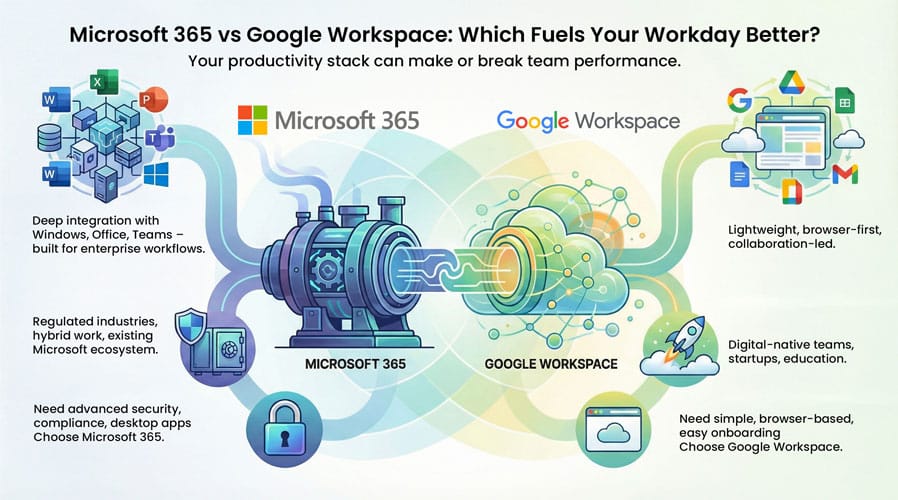
Both suites are powerful. Your choice depends on your business needs:
Choose Microsoft 365 if you need:
- Advanced desktop apps
- Automation & workflows
- Teams-based collaboration
- Enterprise security
- Large storage at lower plans
- Scalability for mid-size & large organizations
Choose Google Workspace if you need:
- Simple cloud-based workflows
- Lightweight collaboration
- Browser-only apps
- Quick adoption with minimal training
Frequently Asked Questions: Microsoft 365 vs. Google Workspace
What is the difference between Google Workspace and Microsoft 365?
Google Workspace vs. Microsoft 365 mainly differs in ecosystem and workflow. Google Workspace is cloud-first and browser-based, ideal for real-time collaboration using Gmail, Docs, Drive, and Meet. Microsoft 365 offers a more robust desktop and enterprise ecosystem with Outlook, Teams, Word, Excel, OneDrive, and advanced security and compliance features.
Which is better for businesses: Google Workspace or Microsoft 365?
Microsoft 365 is better for medium to large enterprises that need advanced security, compliance, and desktop applications. Google Workspace is suitable for startups and small teams that prefer simple, cloud-native collaboration. The choice depends on business size, security needs, and existing IT infrastructure.
Is Microsoft 365 more secure than Google Workspace?
Microsoft 365 provides more advanced enterprise-grade security features such as Microsoft Defender, Conditional Access, identity protection, and compliance tools. Google Workspace also offers strong security, but Microsoft 365 is often preferred in regulated industries.
What is Microsoft 365 and what does it include?
Microsoft 365 is a cloud-based productivity suite that includes Outlook, Teams, Word, Excel, PowerPoint, OneDrive, SharePoint, and enterprise-grade security features. It is designed for collaboration, productivity, and secure business communication.
Is Google 365 the same as Google Workspace?
“Google 365” is a commonly searched but incorrect term. The correct product name is Google Workspace, which includes Gmail, Google Docs, Drive, Meet, Sheets, and Calendar for business productivity and collaboration.
Can I migrate from Google Workspace to Microsoft 365?
Yes. As a Microsoft Solutions Partner, Embee Software has migrated 400+ organizations and 350,000+ users to Microsoft 365 smoothly.
Looking to compare plans, calculate costs, or understand which suite fits your business?